$Rev: 23462 $ by $Author: paulk $ at $Date: 2007-08-22 17:27:53 +0200 (Wed, 22 Aug 2007) $
Table of Contents
Warning
This document is work in progress. See ToDo section.
You are interested in using ASF+SDF to define various aspects of a programming language or domain-specific language but you do now want to wade through all the details in the manual (The Language Specification Formalism ASF+SDF)? In that case, this article may be for you. We take the toy language Pico as starting point and walk you through its syntax, typechecking, formatting, execution and more. We do this while assuming zero knowledge of ASF+SDF or The ASF+SDF Meta-Environment.
ASF+SDF can be used to define various aspects of programming langauges and The ASF+SDF Meta-Environment can be used to edit and run these specifications.
The goal of ASF+SDF is to define the syntax (form) and semantics (meaning) of programming languages and domain-specific languages. The Syntax Definition Formalism (SDF) is used to define syntactic aspects including:
Lexical syntax (keywords, comments, string constants, whiete space, ...).
Context-free syntax (declarations, statements, ...).
The Algebraic Specification Formalism (ASF) is used to define semantic aspects such as:
Type checking (are the variables that are used declared and are they used in a type-correct way?).
Formatting (display the original program using user-defined rules for indentation and formatting).
Fact extraction (extract all procedure calls or all declarations and uses of variables).
Execution (run the program with given input values).
By convention, all these language aspects are located in dedicated subdirectories:
syntax(definitions for the syntax).check(definitions for type checking).format(definitions for formatting).extract(definitions for fact extraction).run(definitions for running a program).debug(definitions for debugging a program).
Apart from giving a standard structure to all language definitions, this organization also enables the seamless integration of these aspects in the user-interface of The Meta-Environment.
The goal of The ASF+SDF Meta-Environment (or The Meta-Environment for short) is to provide an Interactive Development Environment for ASF+SDF specifications. It supports interactive editing, checking and execution of ASF+SDF specifications. Behind the scenes, this implies the following tasks:
Providing a graphical user-interface with editors and various visualization tools.
Tracking changes to specification modules.
Parsing and checking specification modules.
Generating parsers for the syntax modules that have been changed.
Generating rewriter engines for the equations modules that have been changed.
Applying the ASF+SDF specification to programs in the language that is being defined by that specification.
The intended user experience of The Meta-Environment is the seamless automation of all these tasks.
In Historical Notes, we give background and key references.
The anatomies of a complete ASF+SDF specification as well as that of a single module are needed to understand any language definition.
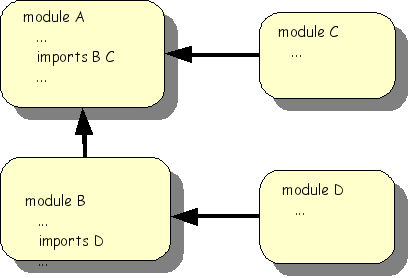
An ASF+SDF specification consists of a collection of modules as shown inthe following figure. A module can import other modules and this can be understood as the textual inclusion of the imported modules.
A single module has the following structure:
moduleModuleName
ImportSection*
ExportOrHiddenSection*equations
ConditionalEquation*
Notes:
| | The name of this module. It may be followed by parameters. |
| | Names of modules imported by this module. |
| | The grammar elements (such as |
 | The equations of the module that define the meaning of the grammar elements. Equations come in two flavours. Unconditional: [<TagId>] <Term> = <Term> and conditional: [<TagId>] <Condition1>, <Condition2>, ... =============================== <Term1> = <Term2> |
The Meta-Environment comes with a considerable library of built-in
languages and datatypes. We explore the datatype
basic/Booleans in the ASF+SDF library.
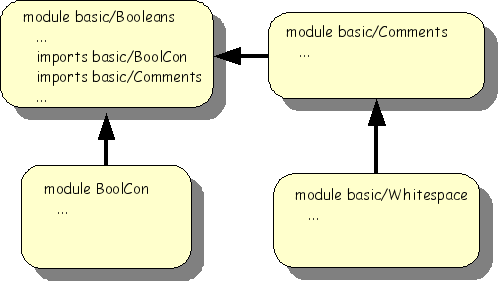
The module structure of basic/Booleans is
shown below.
Let' start with the Boolean constants:
module basic/BoolCon exports sorts BoolCon
Notes:
| | The sort of Boolean constants is defined as
|
| | The constants |
| | We add a start symbol (i.e., the syntactic notion from with
all strings in this language are derived) for
|
The module Whitespace defines what the spaces and newline are:
module basic/Whitespace
exports
lexical syntax
[\ \t\n\r] -> LAYOUT {cons("whitespace")}
context-free restrictions
LAYOUT? -/- [\ \t\n\r] Notes:
| | A regular expression that defines space ( |
| | Lexical syntax tends to become highly ambiguous.e.g., are
two spaces one layout symbol or two consecutive ones? Context-free
restrictions impose restrictions that resolve this. Here, optional
layout ( |
The comment conventions is defines as follows:
module basic/Comments
imports
basic/Whitespace
exports
lexical syntax
"%%" line:~[\n]* "\n" -> LAYOUT {cons("line"),
category("Comment")}
"%" content:~[\%\n]+ "%" -> LAYOUT {cons("nested"),
category("Comment")}
context-free restrictions
LAYOUT? -/- [\%] Notes:
| | Defines an line-based comment that starts with
|
| | Defines a comment that is contained within a single line
between |
| | Again a follow restriction that forces layout followed by a comment to be included in that comment. |
After these preparations, we can now should the syntax part of basic/Booleans:
module basic/Booleans imports basic/BoolCon"(" Boolean ")" -> Boolean {bracket, cons("bracket")}
context-free priorities Boolean "&" Boolean -> Boolean >
Boolean "|" Boolean -> Boolean hiddens context-free start-symbols Boolean
imports basic/Comments
variables "Bool" [0-9]* -> Boolean
Notes:
| | Import the Boolean constants |
| | The sort of Boolean expressions. |
| | Each Boolean constant is also a Boolean expression. This is called an injection rule or a chain rule. |
| | The infix operators for Boolean or ( |
| | The prefix operator not. |
| |
|
| | & has a higher priority than |. The expression
|
| | Define a (hidden) start symbol for Boolean expressions. |
| | Import |
 | Declares Boolean variables like |
Having covered all syntactic aspects of the Booleans, we can now trun our attention to the equations:
equations [B1] true | Bool = true
Notes:
| | Meaning of the or operator, in other words: with these two
rules the |
| | Meaning of and operator. |
| | Meaning of not operator. |
The syntax of ASF+SDF equations is not fixed but depends on the syntax rules. This can be seen by making the fixed ASF+SDF syntax bold and the syntax specific for Booleans italic:
equations [B1] true | Bool = true [B2] false | Bool = Bool [B3] true & Bool = Bool [B4] false & Bool = false [B5] not ( false ) = true [B6] not ( true ) = false
This mixture of syntaxes will become even more apparent when we discuss the Pico definitions later.
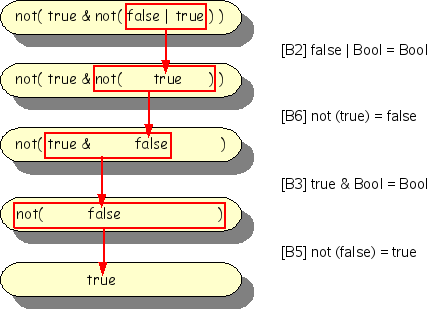
The Boolean term not(true & not(false |
true)) should reduce to true (check this
for yourself before looking at the figure below).
By far the best steps to get acquainted with the Meta-Environment are:
Have a look at the Flash movie: Guided Tour: Playing with Booleans.
Read the explanations and screenshots below.
Get hands-on experience with The Meta-Environment itself.
The example of the Booleans illustrates the following important points that are also valifd for more complex examples:
Each module defines a language: in this case the language of Booleans. In other contexts one can also speak about the datatype of the Booleans. We will use language and datatype as synonyms.
We can use this language definition to;
Create a syntax-directed editor for Boolean language and create Boolean terms.
Apply the equations to this term and reduce it to a normal form (= a term that is not further reducible).
Import it in another module; this makes the Boolean language available for the importing module.
The toy language Pico has a single purpose in life: being so simple that specifications of every possible language aspect are so simple that they fit on a few pages. It can be summarized as follows:
There are two types: natural numbers and strings.
Variables have to be declared.
Statements are assignment, if-then-else and while-do.
Expressions may contain naturals, strings, addition (
+), substraction (-) and concatenation (||).The operators
+and-have operands of type natural and their result is natural.The operator
||has operands of type string and its results is also of type string.Tests in if-then-else statement and while-statement should be of type natural.
Let's look at a simple Pico program that computes the factorial function:
begin declare input : natural,
Notes:
| | Pico programs do not have input/output statements, so we use variables for that purpose. |
| | Pico has no multiplication operator so we have have to simulate it with repeated addition (yes, simplicity comes at a price!). |
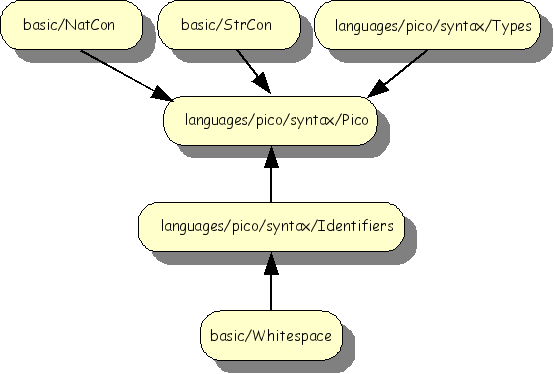
The import structure of the syntax definition of Pico is shown below. The modules
basic/NatCon, basic/StrCon and
basic/Whitespace are reused from the ASF+SDF library.
The modules languages/pico/syntax/Identifiers,
languages/pico/syntax/Types and
languages/pico/syntax/Pico are specified for Pico and
are now discussed in more detail.
Variables can be declared in Pico programs with one of two types: "natural number" or "string". This defined as follows:
module languages/pico/syntax/Types exports sorts TYPE
Notes:
| |
|
| | The constants |
| | The constant |
Identifiers are used for the names of variables in Pico programs. The are defined as follows:
module languages/pico/syntax/Identifiers imports basic/Whitespace exports sorts PICO-ID
Caution
Why importing basic/Whitespace?
Caution
Why are the lexical restrictions missing?
Notes:
| |
|
| | PICO-ID is defined using a regular expression that contains the following elements:
The overall effect of this definition is that Pico identifiers start with a lower case letter that can be followed by lower case letters or by digits. |
After these preparations we can present the syntax for Pico:
module languages/pico/syntax/Pico imports languages/pico/syntax/Identifiers imports languages/pico/syntax/Types imports basic/NatCon imports basic/StrCon hiddens context-free start-symbols
Notes:
| |
|
| | The sorts |
| | This first context-free syntax section declares the toplevel structure of a Pico program. |
| | The rule for PROGRAM contains the list construct |
| | This section declares the syntax for statements. |
| | This final context-free syntax section declares expression syntax. |
| | These three rules define that natural Pico identifiers, natural constants and string constants may occur as expressions. |
| | The syntax of the operators |
| |
|
| | Priorities define the relative ordering of operators and are
used to disambiguate text when more interpretations are possible.
The higher the priority, the stronger the binding. The expression
|
The syntax of Pico illustrates the following important points:
All modules for a syntax definition reside in a subdirectory named
syntax.The main module of the syntax definition has the same name as the language (with an uppercase, since all module names start with an uppercase letter).
The modules languages/pico/syntax/Identifiers, languages/pico/syntax/Types and languages/pico/syntax/Pico define (together with the modules they import) the syntax of the Pico language.
This syntax can be used to:
Generate a parser that can parse Pico programs.
Generate a syntax-directed editor for Pico programs.
Generate a parser that can parse equations containing fragments of Pico programs. This is similar to the use of different syntaxes in the definition of the Booleans and is used for program analysis and transformation.
The typechecking rules for the Pico language are very simple:
The only types are
naturalandstring.All variables should be declared before use.
Left-hand side and Right-hand side of an assignment statement should have equal type.
The test in while statement and if-statement should be
natural.Operands of
+and-should benatural; their result is alsonatural.Operands of
||should bestring; the result is alsostring.
The task of a typechecker for Pico is to assert that a given Pico program complies with the above rules. The typecheker can be seen as a transformation from a Pico program to an error report.
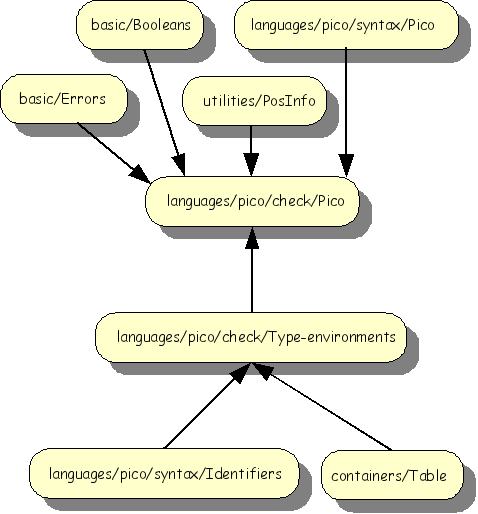
The import structure of the Pico typechecker is shown below.
The purpose of type environments is to maintain a mapping between identifiers and their type. This is done as follows:
module languages/pico/check/Type-environments imports languages/pico/syntax/Identifiers imports containers/Table[PICO-ID TYPE]
Notes:
| | Import the library module |
| | It is pragmatic to give a more descriptive name to
Table[[PICO-ID,TYPE]] and we use the |
For convenience, we list the most functions of Tables here:
module containers/Table[Key Value]
...
context-free
          syntax
"not-in-table" -> Value {constructor}
"new-table" -> Table[[Key,Value]]
lookup(Table[[Key,Value]], Key) -> Value
store(Table[[Key,Value]], Key, Value) -> Table[[Key,Value]]
delete(Table[[Key,Value]], Key) -> Table[[Key,Value]]
element(Table[[Key,Value]], Key) -> Boolean
keys(Table[[Key,Value]]) -> List[[Key]]
values(Table[[Key,Value]]) -> List[[Value]]
...In the case of Type-environments, the formal
parameter Key is bound to PICO-ID
and Value is bound to TYPE.
The central idea of the Pico typechecker is to visit all language constructs in a given Pico program while maintaining a type environment that maps identifiers to their declared type. Whenever an identifier is used, the type correctness of that use in the given context is checked against its declared type that is given by the type environment. An error message is generated when any violation of the type rules is detected. The following type checker is realistic in the following sense:
It discovers all errors.
It generates a message for each error.
The error message contains the source code location of the pico construct that violates the type rules.
The type checker can be directly embedded in and used from The Meta-Environment.
First consider the syntax part of the Pico typechecker:
module languages/pico/check/Pico imports basic/Booleans imports basic/Errors
Notes:
| | The library module basic/Errors describes an error format
that is ubiquitous in The Meta-Environment. There are four
categories of errors: |
| | The library module |
| |
|
| | Several auxiliary functions are defined that are used in the
definition of |
Now let's turn our attention to the equations part of the Pico typechecker:
equations
[Main] start(PROGRAM, Program) =
start(Summary, summary("pico-check",
get-filename(get-location(Program)),
[tcp(Program)]))
equations
[Tc1] tcp(begin Decls Series end) = tcs(Series, tcd(Decls))
equations
[Tc2] tcd(declare Id-type*;) = tcits(Id-type*, new-table)
equations
[Tc3a] tcits(Id:Type, Id-type*, Tenv) =
tcits(Id-type*, tcit(Id:Type, Tenv))
[Tc3b] tcits(,Tenv) = Tenv
equations
[Tc4a] lookup(Tenv, Id) == not-in-table
===========================================
tcit(Id:Type, Tenv) = store(Tenv, Id, Type)
[default] tcit(Id:Type, Tenv) = Tenv
equations
[Tc5a] tcs(Stat ; Stat*, Tenv) =
tcst(Stat,Tenv), tcs(Stat*,Tenv)
[Tc5b] tcs(,Tenv) =
equations
[Tc6a]
not-in-table == lookup(Tenv, Id)
==============================================
tcst(Id := Exp, Tenv) =
error("Variable not declared",
[localized("Id", get-location(Id))])
[default] tcst(Id := Exp, Tenv) =
tce(Exp, lookup(Tenv, Id), Tenv)
[Tc6b] tcst(if Exp then Series1 else Series2 fi, Tenv) =
tce(Exp, natural, Tenv),
tcs(Series1, Tenv), tcs(Series2, Tenv)
[Tc6c] tcst(while Exp do Series od, Tenv) =
tce(Exp, natural, Tenv), tcs(Series, Tenv)
equations
[default] tce(Exp, natural, Tenv) =  error("Expression should be of type natural",
[localized("Expression", get-location(Exp))])
[default] tce(Exp, string, Tenv) =
error("Expression should be of type string",
[localized("Expression", get-location(Exp))])
[Tc7a] tce(Id, Type, Tenv) =
when Type == lookup(Tenv, Id)
error("Expression should be of type natural",
[localized("Expression", get-location(Exp))])
[default] tce(Exp, string, Tenv) =
error("Expression should be of type string",
[localized("Expression", get-location(Exp))])
[Tc7a] tce(Id, Type, Tenv) =
when Type == lookup(Tenv, Id)  [Tc7b] tce(Nat-con, natural, Tenv) =
  [Tc7c] tce(Str-con, string, Tenv) =
[Tc7d] tce(Exp1 || Exp2, string, Tenv) =
tce(Exp1, string, Tenv), tce(Exp2, string, Tenv)
[Tc7c] tce(Str-con, string, Tenv) =
[Tc7d] tce(Exp1 || Exp2, string, Tenv) =
tce(Exp1, string, Tenv), tce(Exp2, string, Tenv)  [Tc7d] tce(Exp1 + Exp2, natural, Tenv) =
tce(Exp1, natural, Tenv), tce(Exp2, natural, Tenv)
[Tc7d] tce(Exp1 - Exp2, natural, Tenv) =
tce(Exp1, natural, Tenv), tce(Exp2, natural, Tenv)
[Tc7d] tce(Exp1 + Exp2, natural, Tenv) =
tce(Exp1, natural, Tenv), tce(Exp2, natural, Tenv)
[Tc7d] tce(Exp1 - Exp2, natural, Tenv) =
tce(Exp1, natural, Tenv), tce(Exp2, natural, Tenv)Notes:
| | The first equation of this module is probably also the most
intimidating one. Its role is similar to the
|
| | Type checking a complete program amounts to typechecking its declarations (this yields a type environment) and checking its statements in that environment. |
| | To type check declarations create a new type environment
( |
| | To check a list of identifier-type pairs, we have to visit
each pair in the list. We use list matching
to achieve this: in the left-hand side |
| | The left-hand side |
| | An identifier that does not yet occur in the type environment is stored in the type environment together with its type. |
| | Again, list matching to decompose a list of statements into a first statement and a list of remaining statements. Next, check the first statement and the remining statements. |
| | Check an assignment statement and discover that the identifier on the left-hand side of the assignment is not declared. Return an error. |
| | Otherwise, check the type of the expression on the
right-hand side of the assignment. The declared type of the
variable on the left-hand side and the derived type of the
expression on the right-hand side should be the same. Note that
the |
| | Checking if-statements and while-statements amounts to
checking that the test is of type
|
| | Two default equations that generate an error message when the expected type and the actual type of an expression are unequal. |
| | When the declared type of an identifier is equal to the expected type, we generate an empty list of errors. |
| | Similarly, natural constants and string constants satisfy the expected types natural, respectively, string. |
| | For operators, the operands are checked separately. |
The Pico typechecker illustrates the following points:
ASF+SDF can be used to define a type checker.
ASF+SDF provides support for error messages and source code locations.
All modules for a typechecker reside in a subdirectory named
check.A typechecker can be integrated with The Meta-Environment.
The evaluation rules for the Pico language are simple as well:
Variables of type
naturalare initialized to 0.Variables of type string are initalized to the empty string.
A variable evaluates to its current value.
The variable on the left-hand side of an assignment statement gets as value the value of the expression on the right-hand side of the assignment.
If the test in an if-statement or while-statement evaluates to 0, this is interpreted as false.
Conversely, if the test in an if-statement or while-statement evaluates to 0, this is interpreted as true.
The statements in a list of statements are evaluated in sequential order.
The task of the Pico evaluator is to reduce a Pico program to the output it generates, in this case a value environment. The Pico evaluator can be seen as a transformation from a Pico program to its output.
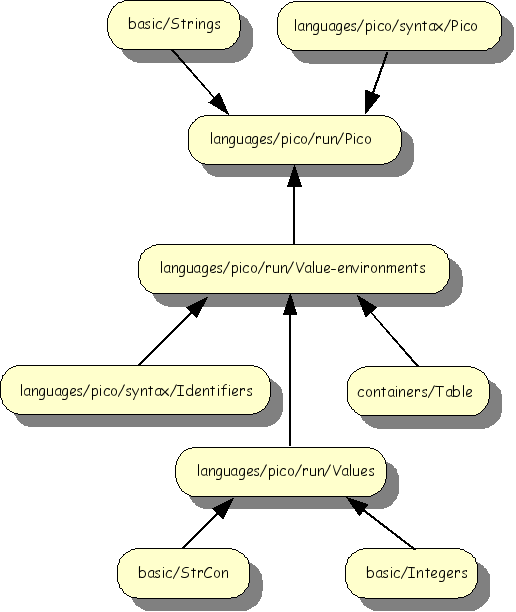
The import structure of the Pico evaluator is shown below.
The sort VALUE is simply a container for
integer and string constants and is defined as follows:
module languages/pico/run/Values

imports basic/Integers basic/StrCon

exports
  sorts VALUE
  context-free syntax
    Integer     -> VALUE
    StrCon      -> VALUE
    "nil-value" -> VALUE
Caution
Why Integer and not IntCon?
Notes:
| | The constant |
The purpose of value environments is to maintain a mapping between identifiers and their current value. This is done as follows:
module languages/pico/run/Value-environments

imports languages/pico/syntax/Identifiers
imports languages/pico/run/Values
imports containers/Table[PICO-ID VALUE]

exports
  sorts VENV
  aliases
    Table[[PICO-ID, VALUE]] -> VENV
After the discussion of Type-environments, this definition should be easy to follow.
The central idea of the Pico evaluator is to first visit the declarations and initialise the declared variables. Next, the statements are visited one-by-one and their effect on the value environment is computed. The final value environment is then retruned as the result of evaluation.
The syntax part of the Pico evaluator looks as follows:
module languages/pico/run/Pico

imports languages/pico/syntax/Pico
imports languages/pico/run/Value-environments
imports basic/Strings

exports
  sorts VALUE-ENV

  context-free syntax
    VENV                          -> VALUE-ENV

  context-free syntax
    "evp"(PROGRAM)                -> VALUE-ENV

  context-free syntax
    "evd"(DECLS)                  -> VENV
    "evits"({ID-TYPE  ","}*)      -> VENV
    "evs"({STATEMENT ";"}*, VENV) -> VENV
    "evst"(STATEMENT, VENV)       -> VENV
    "eve"(EXP, VENV)              -> VALUE

hiddens
  imports basic/Comments
  context-free start-symbols
    VALUE-ENV PROGRAM

  variables
    "Decls"[0-9\']*   -> DECLS
    "Exp"[0-9\']*     -> EXP
    "Id"[0-9]*        -> PICO-ID
    "Id-type*"[0-9]*  -> {ID-TYPE ","}*
    "Nat"[0-9\']*     -> Integer
    "Nat-con"[0-9\']* -> NatCon
    "Series"[0-9\']*  -> {STATEMENT ";"}+
    "Stat"[0-9\']*    -> STATEMENT
    "Stat*"[0-9\']*   -> {STATEMENT ";"}*
    "Str" "-con"? [0-9\']* -> StrCon
    "Value"[0-9\']*   -> VALUE
    "Venv"[0-9\']*    -> VENV
    "Program"[0-9\']* -> PROGRAM
Caution
Why VENV and VALUE-ENV?
Here again, having seen the syntax part of the Pico typechecker
there are no surprises here. The toplevel function
evp maps programs to value environments and needs
some auxiliary functions to achieve this.
The equations part:
equations

[Main] start(PROGRAM, Program) =
       start(VALUE-ENV, evp(Program))

equations

[Ev1]  evp(begin Decls Series end) =
       evs(Series, evd(Decls))

[Ev2]  evd(declare Id-type*;) = evits(Id-type*)

[Ev3a] evits(Id:natural, Id-type*) =
       store(evits(Id-type*), Id, 0)

[Ev3b] evits(Id:string, Id-type*) =
       store(evits(Id-type*), Id, "")

[Ev3c] evits() = []

[Ev4a] Venv' := evst(Stat, Venv),
       Venv'' := evs(Stat*, Venv')
       =========================================
       evs(Stat ; Stat*, Venv) =  Venv''

[Ev4b] evs( , Venv) = Venv

[Ev5a] evst(Id := Exp, Venv) =
       store(Venv, Id, eve(Exp, Venv))

[Ev5b]             eve(Exp, Venv) != 0
       =================================================
       evst(if Exp then Series1 else Series2 fi, Venv) =
       evs(Series1, Venv)

[Ev5c]             eve(Exp, Venv) == 0
       =================================================
       evst(if Exp then Series1 else Series2 fi, Venv) =
       evs(Series2, Venv)

[Ev5d]           eve(Exp, Venv) == 0
       ==========================================
       evst(while Exp do Series od, Venv) =  Venv

[Ev5e] eve(Exp, Venv) != 0,  Venv' := evs(Series, Venv)
       ================================================
       evst(while Exp do Series od, Venv) =
       evst(while Exp do Series od, Venv')

[Ev6a] eve(Id, Venv) = lookup(Venv, Id)
[Ev6b] eve(Nat-con, Venv) = Nat-con
[Ev6c] eve(Str-con, Venv) = Str-con

[Ev6d] Nat1 := eve(Exp1, Venv),
       Nat2 := eve(Exp2, Venv)
       ====================================
       eve(Exp1 + Exp2, Venv) = Nat1 + Nat2

[Ev6e] Nat1 := eve(Exp1, Venv),
       Nat2 := eve(Exp2, Venv)
       ======================================
       eve(Exp1 - Exp2, Venv) =  Nat1 -/ Nat2

[Ev6f] Str1 := eve(Exp1, Venv),
       Str2 := eve(Exp2, Venv),
       Str3 := concat(Str1, Str2)
       ==============================
       eve(Exp1 || Exp2, Venv) = Str3

[default-Ev6]
       eve(Exp,Venv) = nil-value
Notes:
| | A start equations that connects the functions defined here
to The Meta-Environment: given a program, a value environment is
returned and this computed by applying the function
|
| | Here declared variables are initalized. |
| | Evaluation of a series of statements. Observe how the value
environment |
| | Evaluation of if statement; the true case. |
| | Evaluation of if statement; the false case. |
| | Evaluation of while statement; the false case. |
| | Evaluation of while statement; the true case. Note that the
body of the while statement is evaluated and that the resulting
value environment |
| | A varaible evaluates to its current value. |
| | Constants evaluate to themselves. |
| | Operators are evaluated by first evaluating their argument
and then applying the relevant operator to them. Observe that the
|
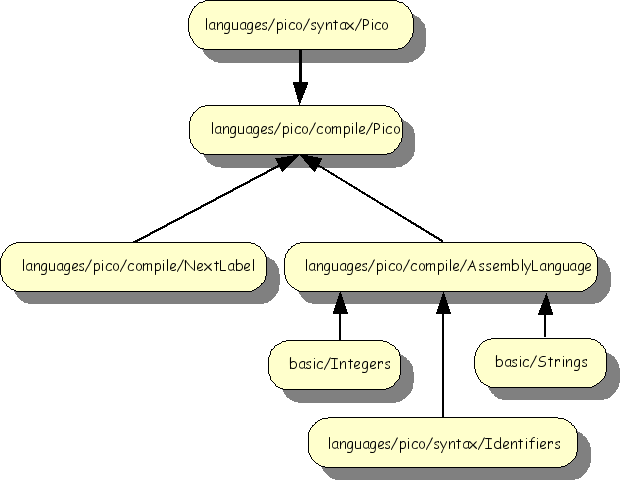
A compiler transforms a program in some higher level language (in this case Pico) to a lower level, in most cases assembly language. We will first define the assembly language and then define the transformation rules from Pico to assembly language. The overall import structure is as follows:
Below, we define an assembly language for a stack-based CPU:
module languages/pico/compile/AssemblyLanguage

imports basic/Integers basic/Strings
imports languages/pico/syntax/Identifiers

exports
  sorts Label Instr
  lexical syntax
    [a-z0-9]+         -> Label

  context-free syntax
    "dclnat" PICO-ID  -> Instr
    "dclstr" PICO-ID  -> Instr

    "push" NatCon     -> Instr
    "push" StrCon     -> Instr
    "rvalue" PICO-ID  -> Instr
    "lvalue" PICO-ID  -> Instr
    "assign"          -> Instr
    "add"             -> Instr
    "sub"             -> Instr
    "conc"            -> Instr
    "label" Label     -> Instr
    "goto" Label      -> Instr
    "gotrue" Label    -> Instr
    "gofalse" Label   -> Instr
    "noop"            -> Instr

  sorts Instrs
context-free syntax
    {Instr";"}+       -> Instrs
Notes:
| | Define an instruction label. |
| | Directives to allocate a variable of type
|
| | Push a naural constant or a string constant on the stack. |
| | Push the value of a variable on the stack. |
| | Push the name of a variable on the stack |
| | Assign to a variable. The top entries on the stack are the value to be assigned and the name of the variable. Both are removed after executing this instruction. |
| | The three operators for addition, subtraction and concatenation. The expect to values on the stack and replace them by the result of the operation. |
| | Declare label. This can be a target of one of the goto instructions. |
| | Goto statements. The unconditional jump
( |
| | A dummy instruction. |
| | A list of instructions separated by semicolons. |
During code generation for Pico statements like if and while, the need will arize to generate new labels to describe the control flow that is implied by these statements. The function nextlabel defined below describes this.
The syntax part looks as follows:
module languages/pico/compile/NextLabel

imports languages/pico/compile/AssemblyLanguage

exports
context-free syntax
  "nextlabel" "(" Label ")" -> Label

hiddens
lexical variables
  "Char+" [0-9]* -> [a-z0-9]+
Notes:
| | The function |
| | The definition uses a so-called lexical variable. Ordinary variables range over the subtrees (or subterms, if you prefer) of a term. In some cases it is necessary to be able to even inspect the contents of the lexical entities that form the leaves of a tree. Examples are identifiers, string constants and sometimes even the layout. Here we want to inspect the textual content of labels and define a lexical variable that ranges over the same lexical syntax as labels. |
Th eqaution part:
equations

 [1] nextlabel(label(Char+)) = label(Char+ x)
The single equation decomposes a given label into a list of
characters and creates a new label with the list of characters with a
single character x appended.
module languages/pico/compile/Pico

imports languages/pico/syntax/Pico
imports languages/pico/compile/AssemblyLanguage
imports languages/pico/compile/NextLabel


exports
  context-free syntax
    trp( PROGRAM ) -> Instrs

hiddens
  context-free start-symbols
    PROGRAM Instrs
  context-free syntax
    trd(DECLS)                    -> {Instr ";"}+
    trits({ID-TYPE  ","}*)        -> {Instr ";"}+
    trs({STATEMENT ";"}*, Label)  -> <{Instr ";"}+ , Label>
    trst(STATEMENT, Label)        -> <{Instr ";"}+ , Label>
    tre(EXP)                      -> {Instr ";"}+

hiddens
  variables
    "Decls"[0-9\']*   -> DECLS
    "Exp"[0-9\']*     -> EXP
    "Id"[0-9]*        -> PICO-ID
    "Id-type*"[0-9]*  -> {ID-TYPE ","}*
    "Nat-con"[0-9\']* -> NatCon
    "Series"[0-9\']*  -> {STATEMENT ";"}+
    "Stat"[0-9\']*    -> STATEMENT
    "Stat*"[0-9\']*   -> {STATEMENT ";"}*
    "Str-con"[0-9\']* -> StrCon
    "Str"[0-9\']*     -> String

    "Instr*"[0-9\']*  -> {Instr ";"}+
    "Label" [0-9\']*  -> Label
"Program" -> PROGRAMequations
[main] start(PROGRAM, Program) =
start(Instrs, trp(Program))
equations
[Tr1] Instr*1 := trd(Decls),
<Instr*2, Label> := trs(Series, x)
==============================================
trp(begin Decls Series end) = Instr*1; Instr*2
[Tr2] trd(declare Id-type*;) = trits(Id-type*)
[Tr3a] trits(Id:natural, Id-type*) =
dclnat Id;
trits(Id-type*)
[Tr3b] trits(Id:string, Id-type*) =
dclstr Id;
trits(Id-type*)
[Tr3c] trits() = noop
[Tr4a] <Instr*1, Label'> := trst(Stat, Label),
<Instr*2, Label''> := trs(Stat*, Label')
=======================================
trs(Stat ; Stat*, Label) =
< Instr*1;
Instr*2
,
Label'' >
[Tr4b] trs( , Label) = <noop, Label>
[Tr5a] Instr* := tre(Exp)
=================
trst(Id := Exp, Label) =
< lvalue Id;
Instr*;
assign
,
Label >
[Tr5b] Instr* := tre(Exp),
<Instr*1, Label'> := trs(Series1, Label),
<Instr*2, Label''> := trs(Series2, Label'),
Label1 := nextlabel(Label''),
Label2 := nextlabel(Label1)
===================================================
trst(if Exp then Series1 else Series2 fi, Label) =
< Instr*;
gofalse Label1;
Instr*1;
goto Label2;
label Label1;
Instr*2;
label Label2
,
Label2 >
[Tr5c] Instr*1 := tre(Exp),
<Instr*2, Label'> := trs(Series, Label),
Label1 := nextlabel(Label'),
Label2 := nextlabel(Label1)
======================== ===============
trst(while Exp do Series od, Label) =
< label Label1;
Instr*1;
gofalse Label2;
Instr*2;
goto Label1;
label Label2
,
Label2 >
[Tr6a] tre(Nat-con) = push Nat-con
[Tr6b] tre(Str-con) = push Str-con
[Tr6c] tre(Id) = rvalue Id
[Trcd] Instr*1 := tre(Exp1), Instr*2 := tre(Exp2)
========================================
tre(Exp1 + Exp2) = Instr*1; Instr*2; add
[Tr6e] Instr*1 := tre(Exp1), Instr*2 := tre(Exp2)
========================================
tre(Exp1 - Exp2) = Instr*1; Instr*2; sub
[Tr6f] Instr*1 := tre(Exp1), Instr*2 := tre(Exp2)
==========================================
tre(Exp1 || Exp2) = Instr*1; Instr*2; conc