Designing a Notation Using ixml
Steven Pemberton, CWI, Amsterdam

The original design of ixml did not focus on converting text files into particular XML document types, but converting them to some XML document type for further transformation. However, the other direction is possible: if you have a particular document type, you can design a textual notation for it. This paper treats a particular use case, in order to reveal some of the options and techniques available to designers of such a notation.
Keywords: Markup, ixml, Invisible Markup, notations, parsing, XML, design, XForms.
ixml's original design: allow non-marked-up textual documents to be treated as if they were XML documents with markup.
Part of a progression of document abstractions:
The design of ixml was not to convert textual documents to any particular XML document types, but just to get a textual document into an XML form that could later be refined as necessary using existing XML tools.
You are unlikely to be able to target an existing document type, only:
However it is possible to work in the other direction:
Given an existing XML document type, you can design a textual representation for it for use with ixml.
People seem to prefer authoring flat textual documents, because they can see the structure unaided, and find the need to add markup a distraction.
Example: Markdown, a flat version of (X)HTML.
What are the processes you have to go through to design a flat textual notation, and what options do you have?
For instance, XForms.
XForms Example
style app.css

data admin.xml
   relevant message .!=''
   type weight integer
   constraint weight .>0
   type weight/@date date

data #weights weights.xml

submission #save put:instance('weights') to:weights.xml replace:none {
   FAILURE setvalue message "Save failed"
   SUCCESS setvalue message ""
}

input weight "Weight" incremental
output.error message "Error"

trigger "Save" {
   DOMActivate? {
      setvalue weight/@date local-dateTime()
      insert weight into:instance('weights')/weight
      submit
   }
}
<html xmlns='http://www.w3.org/1999/xhtml'>
<head>
<title>XForms Example</title>
<link href='app.css' type='text/css' rel='stylesheet'/>
<model ev:event='xforms-ready'>
<instance src='admin.xml'/>
<bind ref='message' relevant='.!='''/>
<bind ref='weight' type='integer'/>
<bind ref='weight' constraint='.>0'/>
<bind ref='weight/@date' type='date'/>
<instance id='weights' src='weights.xml'/>
<setvalue ref='weight/@date' value='local-dateTime()'/>
<submission id='save' method='PUT' ref='instance('weights')' resource='weights.xml' replace='none'>
<action ev:event='xforms-submit-error'>
<setvalue ref='message'>Save failed</setvalue>
</action>
<action ev:event='xforms-submit-done'>
<setvalue ref='message'/>
</action>
</submission>
</model>
</head>
<body>
<group xmlns='http://www.w3.org/2002/xforms'>
<input ref='weight'>
<label>Weight</label>
</input>
<output class='error' ref='message'>
<label>Error</label>
</output>
<trigger ev:event='DOMActivate'>
<label>Save</label>
<insert origin='weight' ref='instance('weights')'/>
<send/>
</trigger>
</group>
</body>
</html>
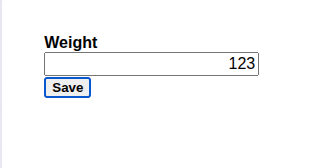
This presentation differs in detail from the current paper, which will be updated in due course.
For an existing XML document type, the structure has already been specified: there are no decisions to be made.
For instance, the top level ixml rules for Markdown must be
html, head, and body, since they have to
match the final target structure.
Similarly, for XForms, the overall structure of the rules can be determined directly from the XForms schema.
At the top level we get the ixml rules from the XForms schema:
         model: (instance; bind; action; submission)*.
      -Content: Controls.
     -Controls: Core-Controls; group; switch; repeat.
-Core-Controls: input; secret; textarea; output; upload;
                range; trigger; submit; select; select1.
(Rule names with an initial lower-case letter are used for actual elements that will occur in the output; names with an initial capital are other rules).
XForms wasn't designed to be a standalone language, but one embedded in other languages, so we need to specify a top-level structure in a host language, in this case XHTML:
html: head, body.
where head contains the models, and body contains
the content. For instance:
head: title, Style*, model+.
body: Content.
There are two approaches to recognising input:
For instance, since the title is the first item in the head, we can just use positioning and require that the first line be the title of our XForm:
title: ~[#a]+, nl.
The rule for nl requires a newline, and allows extra optional
trailing space:
-nl: -#a, s?.
The rule for s is to allow trailing space, but we will also use
it where spacing is required, not just optional:
-s: -[" "; #9; #a]+.
For styling we use extra characters to identify the input, in this case the word "style".
XForm Example
style app.css
Although it would also be possible to allow embedded CSS, to keep it simple
we will just use html link elements:
          -Style: -"style", s, link.
            link: href, Style-type, Style-rel.
           @href: URL.
@Style-type>type: +"text/css".
  @Style-rel>rel: +"stylesheet".
            -URL: [L;"0"-"9"; ":/@.~#?"]+.
                  {A simple version for now}
This requires a URL, and adds two other attributes to the output.
Note how ixml renaming has been used, and the use of insertions to provide fixed content:
@Style-type>type: +"text/css".
Renaming is not yet officially part of ixml, but is in the evolving future specification and in all implementations.
So a flat XForm beginning
XForm Example
style app.css
gives an output that starts
<html>
  <head>
    <title>XForm Example</title>
    <link href='app.css' type='text/css' rel='stylesheet'/>
How to deal with namespaces is not yet resolved in the working group.
Although XML namespace declarations look like attributes, they have
a different semantic interpretation because they begin with the characters
xmlns.
Since ixml is just producing an XML document, it can use the same approach:
treating something that looks like an attribute as a namespace declaration if
it starts with the letters xmlns.
For implementations that produce textual output, this adds no extra processing; for implementations that go directly to an XML internal form, the namespace declarations have to be recognised and handled appropriately.
Accepting this, we can redefine the html rule to include a
namespace in this way:
           html: xhtml-ns, head, body.
@xhtml-ns>xmlns: +"http://www.w3.org/1999/xhtml".
which will give
<html xmlns='http://www.w3.org/1999/xhtml'>
We can do the same to enclose the XForms controls in the body in an element that declares the namespace:
          body: Content.
 Content>group: xf-ns, Controls.
  @xf-ns>xmlns: +"http://www.w3.org/2002/xforms".
which will give
<body>
   <group xmlns='http://www.w3.org/2002/xforms'>
The controls come straight from the XForms schema:
     -Controls: Control*.
      -Control: CoreControl; group; switch; repeat.
  -CoreControl: input; secret; textarea; output; upload;
                range; trigger; submit; select; select1.
Most controls have a number of required parameters, and a number of optional
ones. For instance, consider input:
<input ref="person/@age">
   <label>Age</label>
</input>
We can define this using a leading keyword and then positioning:
input person/@age "Age"
like this:
input: -"input", s, ref, label.
 @ref: XPath.
label: -'"', ~['"'; #a]*, -'"', s?.
XPath: [L; "0"-"9"; "/:@[]()+-*'><!=."]+, s?.
        {A simple version for now}
There's one other useful attribute for several controls, and that is
incremental="true" that specifies that the control activates for
every character typed.
Since incremental="false" is the default, we don't have to
specify it, so you can write:
input person/@age "Age" incremental
by changing the rule for input to:
       input: -"input", s, ref, label, incremental?.
@incremental: -"incremental", +"true", s?.
so that we get
<input ref='person/@age' incremental='true'>
   <label>Age</label>
</input>
Nearly all elements in XForms can have certain common attributes, in
particular class for presentation purposes, and id
for identification.
<output class="error" id="out1" ref="message">
   <label>Error</label>
</input>
One option would be to give these a keyword to identify them:
output class:error id:out1 message "Error"
Another way would be to use the same notation as used in CSS:
output.error #out1 message "Error"
like this:
output: -"output", class?, id?, ref, label.
@class: -".", name.
   @id: -"#", name.
 -name: [L], [L; "0"-"9"]+, s?.
We can group them together as Common attributes:
-Common: class?, id?.
and use them everywhere:
output: -"output", Common, ref, label.
Going back to the definition of the head
head: title, Style*, model+.
we still have to define the model.
For instance:
model: "model", s, id?,
       (instance; bind; Action; submission)*.
with
instance: -"data", s, id?, src.
    @src: URL.
and
bind: -"properties", s, ref, Property+.
and
  -Property: type; constraint; relevant; required; readonly.
      @type: -"type:", s?, name.
@constraint: -"constraint:", s?, Expression.
-Expression: XPath.
(we'll come back to Action and submission
later).
model
   data people.xml
   properties person/@age type:integer constraint:.>0
As you can see, we are not obliged to use the same keywords in the input as the elements in the output.
So in this case for example we have replaced the somewhat technical-sounding
instance with the more general data, and
bind with properties.
To distinguish the various types of property in a bind, we have used keywords. However another approach would be to give them each a separate definition:
model
   data people.xml
   type person/@age integer
   constraint person/@age .>0
like this:
 -Model-content: (instance; Bind; Action; submission)*.
          -Bind: Type; Constraint; Relevant; Required; Readonly.
      Type>bind: -"type", s, ref, s, type.
          @type: name.
Constraint>bind: -"constraint", s, ref, constraint.
    @constraint: Expression.
etc., yielding
<model>
   <instance src='people.xml'/>
   <bind ref='person/@age' type='integer'/>
   <bind ref='person/@age' constraint='.>0'/>
Nearly all XForms applications have only a single model, so an alternative approach is to define models so that in the simple (usual) case you don't have to declare a model at all, only when there is more than one:
               head: title, Style*, Models.
            -Models: Single-model; model+.
-Single-model>model: Model-content.
              model: -"model", s, id?, Model-content.
allowing in the simple case:
XForms Example
style app.css
data people.xml
   type person/@age integer
   constraint person/@age .>0
Some controls can contain other content, and be nested, the simplest case
being group:
<group>
   ...controls...
</group>
So we have a design a syntax for this style of control. Options could include
group:
   ...
:group
or
group
   ...
/group
or
group{
   ...
}group
or indeed just
group {
   ...
}
Controls that are not principally containers, may also contain content:
<input ref="person/@age">
   <label>Age</label>
   <dispatch name="CHANGED" targetid="m" ev:event="xforms-value-changed"/>
</input>
so it would be good if any syntax we choose be consistent with these cases. For instance:
input person/@age "Age" {
   dispatch CHANGED m xforms-value-changed
}
and
input person/@age "Age" {
   hint "An integer"
}
We can do this by declaring a block:
-Block: -"{", s?, Controls, "}", s?.
and then define group as:
group: -"group", Common, ref?, label?, Block.
which requires a block, and
input: -"input", Common, ref, label, incremental?, Block?
where it is optional.
XForms actions respond to asynchronous events.
We have already seen one above, dispatch.
Each has its own attributes, plus optionally an event being responded to.
For instance within a submission, a setvalue might look like
this.
<setvalue ref="message"
           ev:event="xforms-submit-error">Failed</setvalue>
We could represent this directly as
setvalue message "Failed" xforms-submit-error
however, setvalue can also calculate a value
<setvalue ref="count" value=".+1" ev:event="DOMActivate"/>
Luckily these two cases are syntactically distinguishable, so we can define it as
         setvalue: -"setvalue", s, ref, (string; value), event.
           @value: expression.
@event>"ev:event": name.
There is a grouping element for several actions, called
action:
<action ev:event="xforms-ready">
   <setvalue ref="date" value="local-dateTime()"/>
   <dispatch name="TICK" targetid="clock"/>
</action>
We can treat that in the same way that we treated group
earlier:
      action: -"action", s, event, ActionBlock.
-ActionBlock: -"{", s?, Action*, -"}", s?.
     -Action: toggle; setvalue; dispatch; action. {etc}
allowing
action xforms-ready {
   setvalue date local-dateTime()
   dispatch TICK clock
}
However, we are not confined to doing it this way. Another approach would express it as:
xforms-ready? {
   setvalue date local-dateTime()
   dispatch TICK clock
}
defined by:
action: event, -"?", s?, (Action; ActionBlock).
which would also allow:
DOMActivate? setvalue count .+1
HTTP submission is complicated, and so the XForms submission
element is as well.
Therefore we will only address a subset of its features here.
A typical submission looks like this:
<submission id="save" method="put" ref="instance('data')"
            resource="data.xml" replace="none">
    <setvalue ref="message" ev:event="xforms-submit-error"
       >Save failed</setvalue>
    <setvalue ref="message" ev:event="xforms-submit-done"/>
</submission>
which could be represented like this:
submission #save put:instance('data') to:data.xml
           replace:none
{
   xforms-submit-error? setvalue message "Save failed"
   xforms-submit-done? setvalue message ""
}
However, this is such a common pattern, it might be worth enforcing the handling of the return events, something like this:
submission #save put:instance('data') to:data.xml
           replace:none
{
   FAILURE setvalue message "Save failed"
   SUCCESS setvalue message ""
}
along these lines:
        submission: -"submission", Common, s, Method,
                      resource, replace?, SubBlock.
           -Method: PUT; GET; POST; DELETE; HEAD.
              -PUT: method-put, ref.
              -GET: method-get, ref.
@method-put>method: -"put:", +"PUT".
@method-get>method: -"get:", +"GET".
etc.
A Submission Block then allows the success and failure parts in either order:
            -SubBlock: -"{", s?,
                      (SUCCESS, FAILURE;
                       FAILURE, SUCCESS), -"}", s?.
       SUCCESS>action: -"SUCCESS", s?, evSuccess,
                         (Action; ActionBlock).
@evSuccess>"ev:event": +"xforms-submit-done".
       FAILURE>action: -"FAILURE", s?, evFailure,
                         (Action; ActionBlock).
@evFailure>"ev:event": +"xforms-submit-error".
giving an output like this:
<submission id='save' method='PUT' ref='instance('data')' resource='data.xml' replace='none'>
<action ev:event='xforms-submit-error'>
<setvalue ref='message'>Save failed</setvalue>
</action>
<action ev:event='xforms-submit-done'>
<setvalue ref='message'/>
</action>
</submission>
XForms Example
style app.css

data admin.xml
   relevant message .!=''
   type weight integer
   constraint weight .>0
   type weight/@date date

data #weights weights.xml

submission #save put:instance('weights') to:weights.xml
            replace:none
{
   FAILURE setvalue message "Save failed"
   SUCCESS setvalue message ""
}

input weight "Weight" incremental
output.error message "Error"

trigger "Save" {
   DOMActivate? {
      setvalue weight/@date local-dateTime()
      insert weight into:instance('weights')/weight
      submit
   }
}
<html xmlns='http://www.w3.org/1999/xhtml'>
<head>
<title>XForms Example</title>
<link href='app.css' type='text/css' rel='stylesheet'/>
<model ev:event='xforms-ready'>
<instance src='admin.xml'/>
<bind ref='message' relevant='.!='''/>
<bind ref='weight' type='integer'/>
<bind ref='weight' constraint='.>0'/>
<bind ref='weight/@date' type='date'/>
<instance id='weights' src='weights.xml'/>
<setvalue ref='weight/@date' value='local-dateTime()'/>
<submission id='save' method='PUT' ref='instance('weights')' resource='weights.xml' replace='none'>
<action ev:event='xforms-submit-error'>
<setvalue ref='message'>Save failed</setvalue>
</action>
<action ev:event='xforms-submit-done'>
<setvalue ref='message'/>
</action>
</submission>
</model>
</head>
<body>
<group xmlns='http://www.w3.org/2002/xforms'>
<input ref='weight'>
<label>Weight</label>
</input>
<output class='error' ref='message'>
<label>Error</label>
</output>
<trigger ev:event='DOMActivate'>
<label>Save</label>
<insert origin='weight' ref='instance('weights')'/>
<send/>
</trigger>
</group>
</body>
</html>
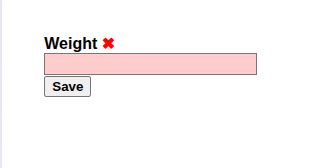
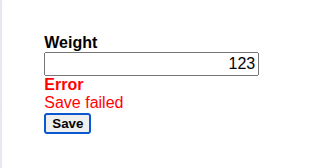
This is not a complete or final design of a flat version of XForms, and there are still many details that need to be completed.
Designing a text notation for an XML Document type is an interesting, even fun, exercise.
While the overall structure of the document is already fixed, the designer has a lot of freedom in using keywords, extra characters, or positioning, to identify syntactic forms.
While at first unexpected, there is also a lot of freedom in the choice of keywords and similar, that are not required to match the terminology used in the document type.